Amourly logo Get the app
FOR COUPLES IN DIFFERENT PLACES

Long distance relationship app for iPhone. For the days between visits.

Amourly is a long distance relationship app for iPhone that keeps you in each other's day between calls. Your love notes, moods, photos and drawings show up in widgets on your partner's Home Screen or Lock Screen, next to a days-together counter and a countdown to your next special day. Together you build a shared journal and a map of the places you've been.

Free to start · iPhone with iOS 16.4 or later · One Premium plan covers you both

WHAT LANDS ON THEIR HOME SCREEN
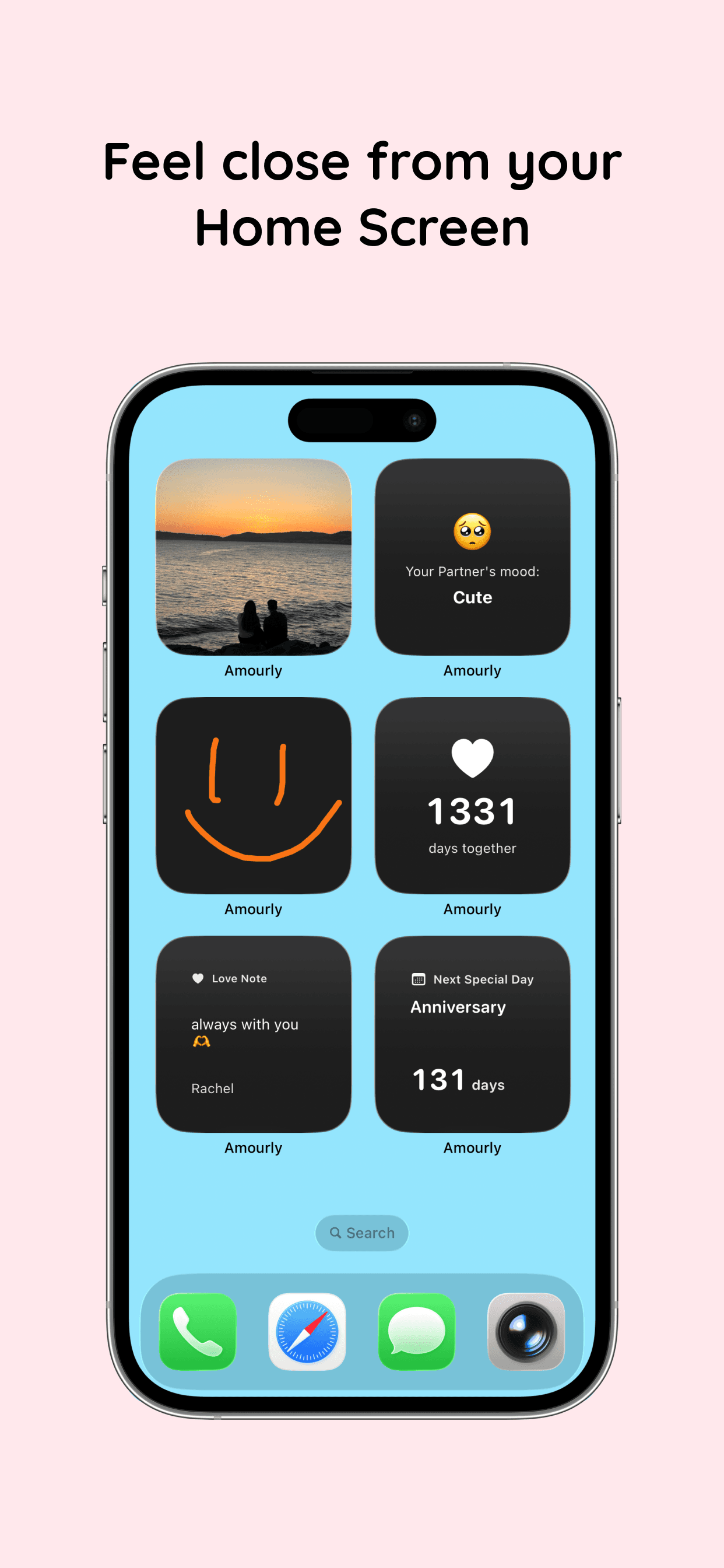
Amourly widgets on an iPhone Home Screen: a shared photo, partner mood, a drawing, days together, a love note and the next special day
WHAT IT DOES WHILE YOU'RE APART

Be part of their day, not just their evening call.

Distance turns a lot of life into a recap. You save everything for the nightly call, and by then the little things have gone. Amourly gives you somewhere to send them as they happen, in a few seconds, without your partner needing to be awake or free.

  • Love notes, photos and drawings on their Home Screen widgets
  • Your mood and a love note preview on their Lock Screen
  • Love taps, like a hug or a boop, sent as a notification
  • A days-together counter and a countdown to your next special day
  • A shared journal and a map of the cities and countries you've visited
HOW LONG DISTANCE COUPLES USE IT

Three moments where distance usually wins.

01 / Different time zones

Leave it for their morning.

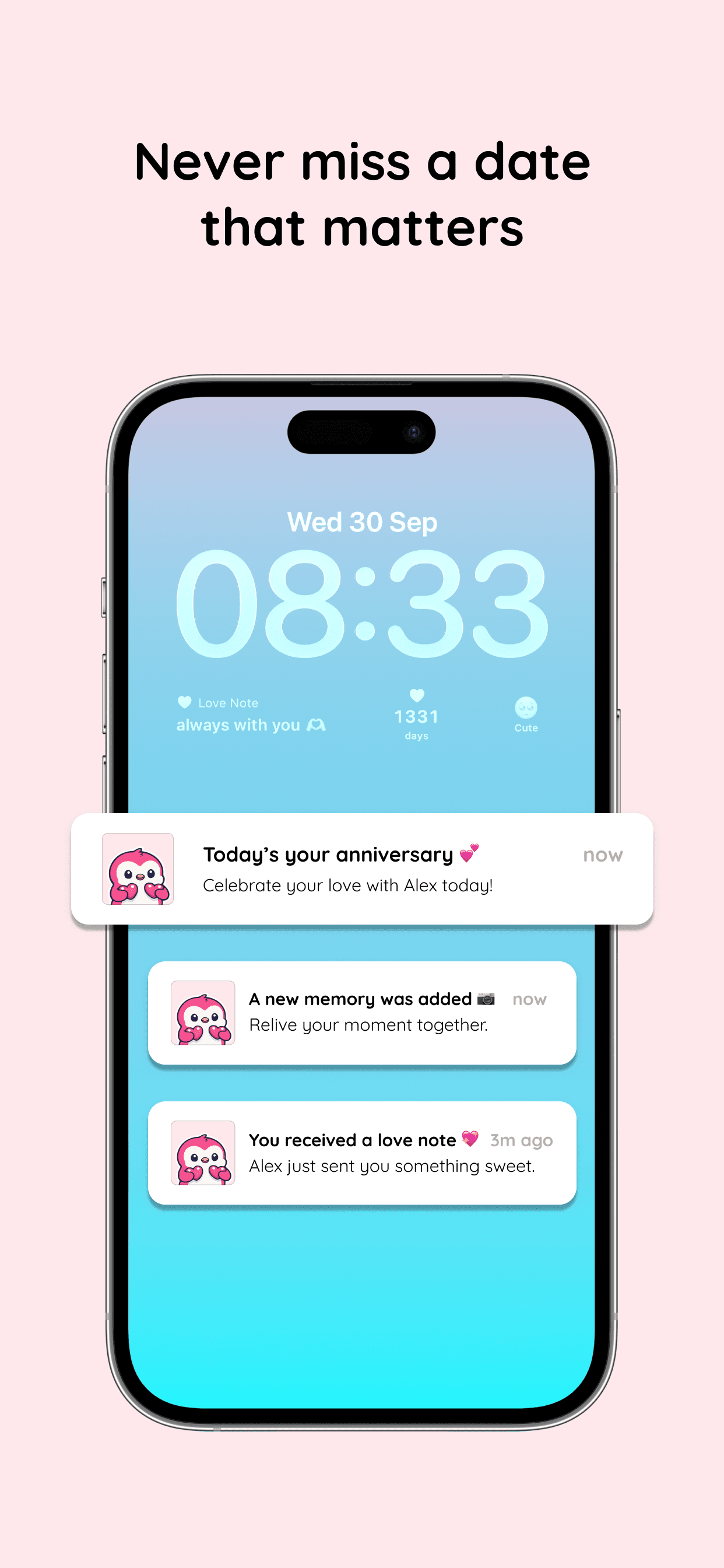
It's midnight where you are and 7 a.m. where they are. Instead of staying up for a call, send a love note before bed. They'll see it on their Lock Screen or Home Screen widget when they reach for their phone, and they can reply on their own time. Nobody loses sleep, and nothing needs an instant answer.

See how love notes work
iPhone Lock Screen with Amourly widgets and notifications for a new love note, a new memory and an anniversary
02 / Ordinary days, shared as they happen

Send the small stuff, not just the recap.

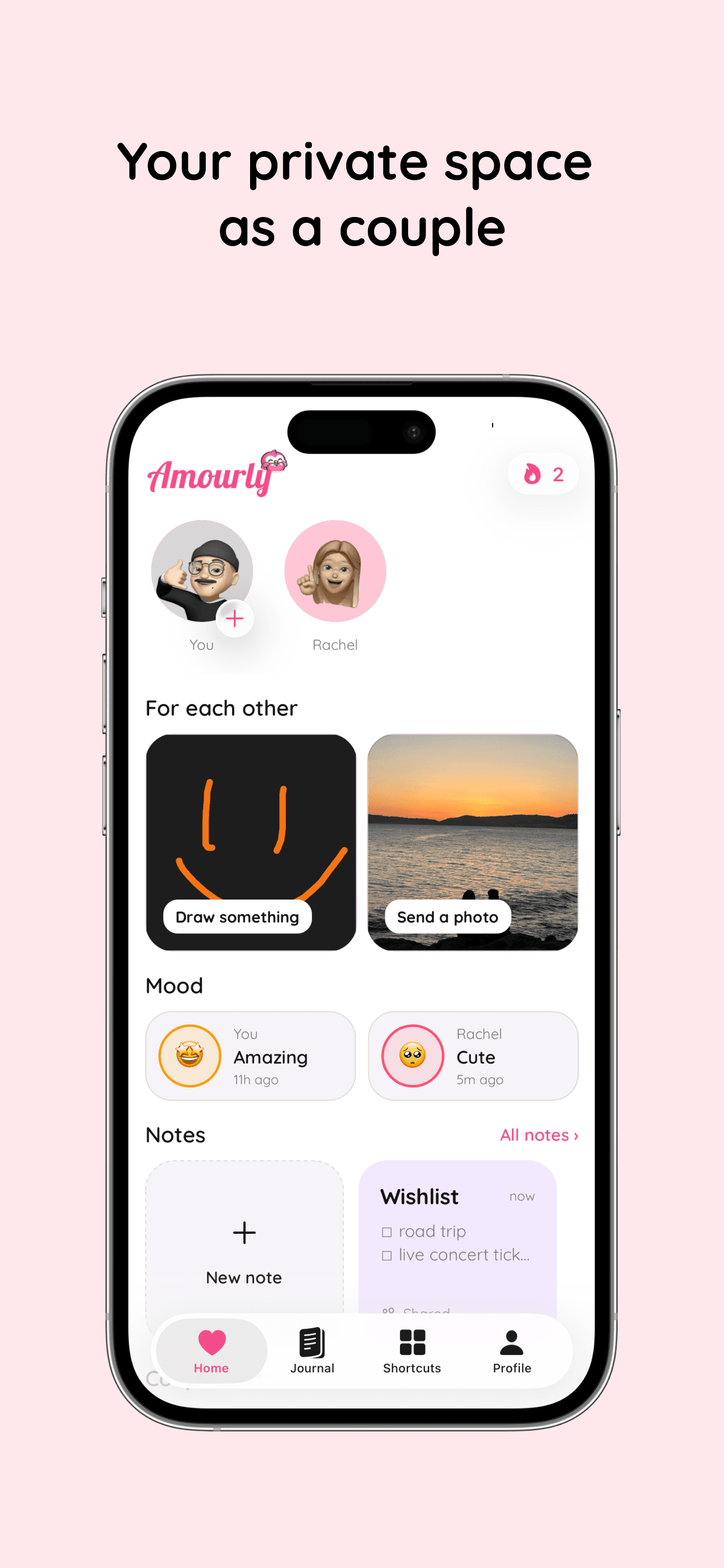
What you miss most is rarely big news. It's the sunset on the walk home, a terrible sandwich, a mood that shifted after lunch. Snap a photo, set your mood, doodle something silly or send a tap between meetings. It takes seconds, and your partner gets a glimpse of your actual day instead of a summary on tonight's call.

See all seven couple widgets
Amourly couple home screen with a drawing, a shared photo and both partners' moods
03 / The next visit

Count down to the next visit, then keep it.

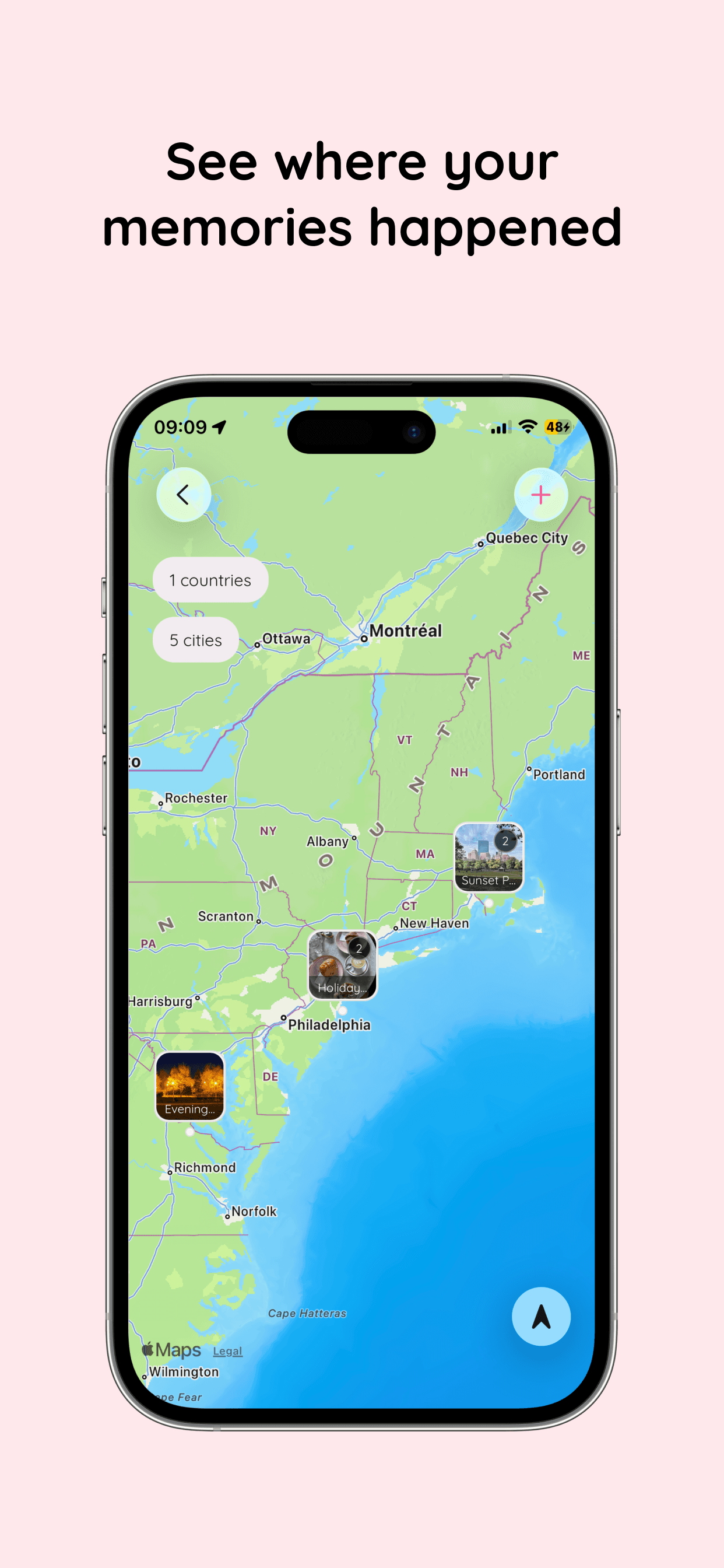
Add your next visit as a special day and call it whatever you like, from “Flight home” to “Lisbon!”. The Next Special Day widget shows how many days are left, right beside your days-together count. When you're finally in the same place, save the photos to your shared journal with the date and place, and watch your map of cities and countries fill in.

Explore the shared journal
Amourly map showing shared memories pinned to the cities where they happened
OTHER LONG DISTANCE APPS

Where Amourly fits next to the apps you've heard of.

Most lists of the best apps for long distance couples recommend a handful, and that makes sense: each one does a different job. Here's what the usual picks are built for and where Amourly fits. We make Amourly, so we've stuck to what each app is for.

Cupla

Built for: A shared calendar that syncs both partners' work and personal calendars, plus date planning and lists.

Where Amourly fits: Useful for finding a weekend that works for both of you. Amourly has special days and countdowns, not a full calendar. Amourly vs Cupla

Paired

Built for: A daily question, quizzes and therapist-written courses to talk through together.

Where Amourly fits: Amourly has no questions or quizzes. It's for quick moments during the day, not sit-down sessions. Amourly vs Paired

Locket

Built for: Photos from up to 20 close friends, shown on your Home Screen widget.

Where Amourly fits: Amourly's photo widget is just for the two of you, with notes, moods, drawings and special days alongside. Amourly vs Locket

Widgetable

Built for: Dozens of social widgets and virtual pets you raise together, including a distance widget. Ad-supported.

Where Amourly fits: Amourly has fewer widgets, no pets and no ads, and it doesn't show distance or location. Amourly vs Widgetable

Teleparty

Built for: Synced playback on streaming services, so you can watch the same show at the same time with a chat alongside.

Where Amourly fits: Amourly doesn't do watch parties. Keep Teleparty for movie night and use Amourly for the days in between.

Marco Polo

Built for: Video messages your partner watches and answers whenever they're free.

Where Amourly fits: Amourly is built around quick notes, taps, photos and drawings rather than video conversations.

Want the full side-by-side? See all our couples app comparisons.

GETTING STARTED

Set it up in a few minutes.

01

You each download Amourly on your iPhone and connect with an invite.

02

Add Amourly widgets to your Home Screen or Lock Screen so their notes, mood and photos are in view.

03

Save your next visit as a special day and watch the days count down.

Looking for things to do together? Try these long distance relationship activities

COMMON QUESTIONS

Long distance relationship app FAQ

The practical questions couples ask before you both download.

Is Amourly free for long distance couples?

Yes, it's free to start. The free plan includes love notes, taps, moods, photos, journal entries and core widgets, with some limits. Amourly Premium is optional at $9.99 a month or $44.99 a year, and one subscription covers both partners.

Is Amourly only on iPhone?

Yes. Amourly needs an iPhone with iOS 16.4 or later. It isn't available on Android, iPad or the web.

Do both partners need the app?

Yes. You each install Amourly on your own iPhone and connect with an invite, so what one of you sends shows up in the other's app and widgets.

Does Amourly show my partner's live location or distance?

No. Amourly doesn't track live location or show the distance between you. You can choose to add a place to a journal memory, which is how your map of cities and countries fills in.

Does Amourly work across time zones?

Yes. Nothing needs you both online at the same time. Send a note, tap, photo or drawing whenever it suits you, and it's waiting in your partner's app and widgets when they pick up their phone.

What's the best app for a long distance relationship?

It depends on what you miss most. Cupla is good for planning around two calendars, Paired for structured conversations, Teleparty for watching shows together and Marco Polo for video messages. If you miss the small, everyday back-and-forth, Amourly is built for that: notes, taps, moods, photos and drawings on each other's iPhone.

FOR THE TIME BETWEEN VISITS

Make room for the moments between visits.

Download Amourly, invite your partner, and send the first note tonight. It'll be waiting when they wake up.

Download on App Store